· 4 min read
Scaling coding agents, part 3: agents that pick their own machine
Agents kept piling onto busy machines. A fleet command lets them check load before they start, and SlowShield holds new packages back for seven days.
In part 1 my agents spread across machines, and in part 2 every machine got the same setup. Then I added a second HP EliteDesk G5 and the next problem showed up: agents didn’t know which machine was free. When I looked, two workers sat at 99% CPU while a 10-core machine idled at 1%.
A dashboard for me, a command for agents
I already had the data. A small dashboard on my Unraid server collects CPU, RAM, disk and temperature from every machine, and I check it from my phone.
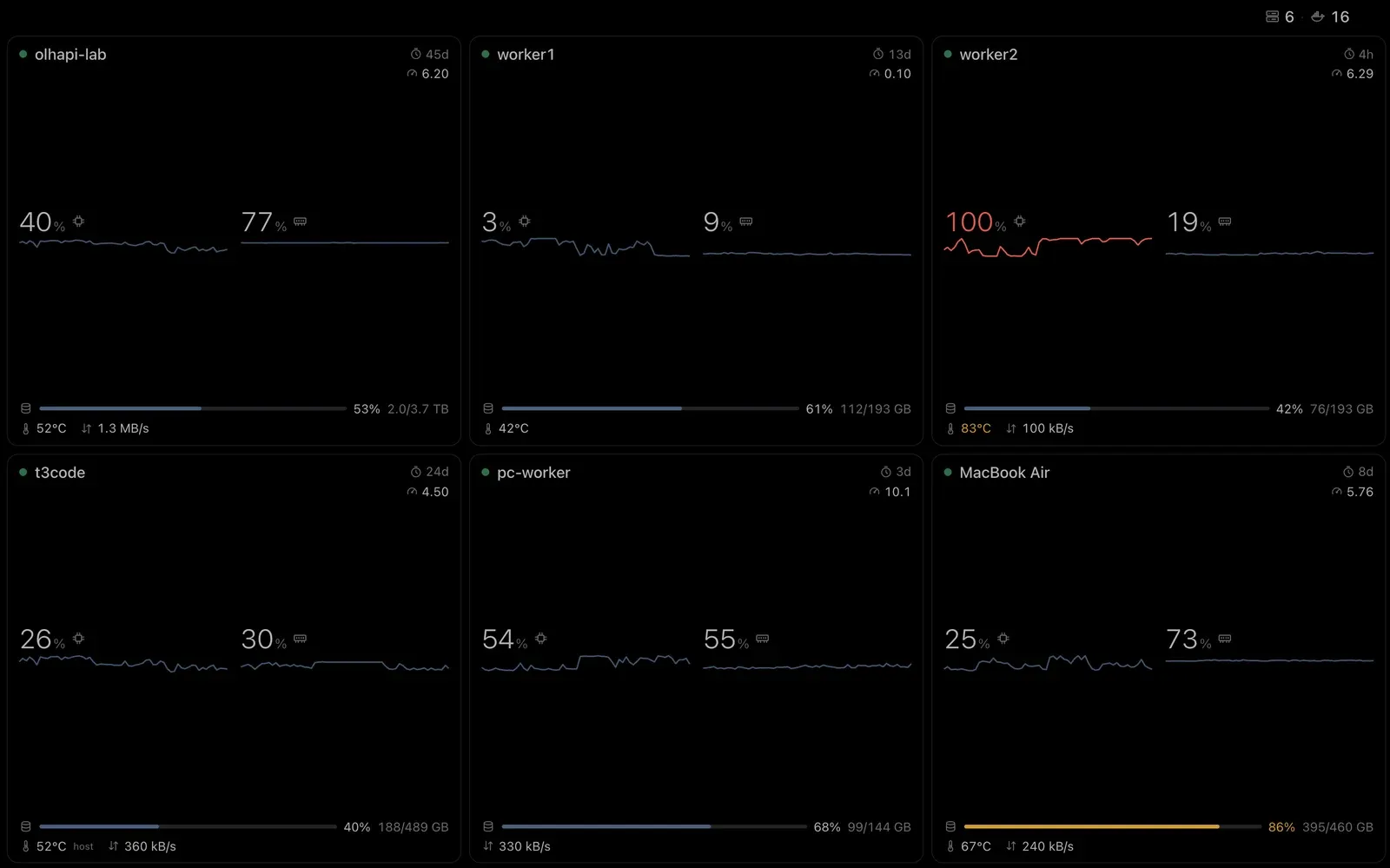
Agents couldn’t read it, and I didn’t want every agent to have SSH access to every machine. So the dashboard got one more endpoint, and every machine got a fleet command:
$ fleet
machine      cpu  5 min  free cores  free ram  free disk  notes
t3code        0%     1%   9.9 of 10    9.3 GB     325 GB
MacBook Air  20%    28%   7.2 of 10    7.6 GB      64 GB
worker1      27%    13%    4.8 of 6     24 GB      80 GB
pc-worker    76%    61%   3.8 of 12    9.7 GB      32 GB
worker2      99%    93%    0.2 of 6   23.3 GB     115 GB
olhapi-lab   10%    10%  10.8 of 12    7.3 GB    1765 GB  infra, not for agent work
(best for new work first)
The list is sorted by free cores, so the first line is the answer. The 5-minute column keeps a machine that paused for a second from looking idle, and free RAM and disk tell an agent whether a heavy build will fit. Here a new build goes to t3code, and nothing goes to worker2.
When a machine looks busy, a second command shows what is using it:
$ fleet top worker2
worker2 (inside worker2-vm), by CPU (100% = one core)
   pid  cpu%  ram MB  name
600788  97.1      39  cc1
601409  93.1      17  nasm
601634  71.6     115  cc1plus
601658  32.4     198  clippy-driver
580365   3.9      27  sccache
That is another agent’s C and Rust build, not a stuck process, so the right move is to leave it alone. The same list sorted by RAM follows, and fleet --json returns both for scripts.
One line in the shared agent instructions does the rest: run fleet before placing new work, and prefer the top machine that suits the task. The sync from part 2 put the command and that line on every machine.
- Plain HTTP, not MCP. An MCP server loads its tool descriptions into every session on every machine, and has to be registered per agent.
curlalready works in every agent, subagent, hook and script. For one read-only lookup that’s enough. - Keep it small. The dashboard’s own API returns 21 KB, mostly history. The agent view is about 1 KB, sorted, best machine first.
- Say what not to use. The notes column marks the server that isn’t for agent work, a machine that is low on disk, and one that is switched off.
New packages wait seven days
The risk is a supply-chain attack. Someone takes over a maintainer’s account, or a publish token leaks, and a new version of a popular package ships with malware in it. Nothing looks wrong: the name is right and the version is one patch higher. npm install then runs the package’s install script with your user’s rights. The script can read whatever that user can read: SSH keys, cloud credentials, API tokens, and the publish rights it needs to spread to your own packages.
A lockfile protects you only until someone updates a dependency or adds one. Agents do both all day, on every machine, and nobody reads what came down. An agent can’t tell that a release is an hour old.
These attacks are usually noticed fast, and the bad version is pulled within hours or days. So the dangerous time is the first days of a release. That is what SlowShield covers. It is a free, open-source proxy that sits between every package manager and npm, PyPI, crates.io, Go modules, container registries and more. It holds new releases back for seven days, blocks packages already reported as malware, and verifies each download. The cost is that I get new versions a week late.
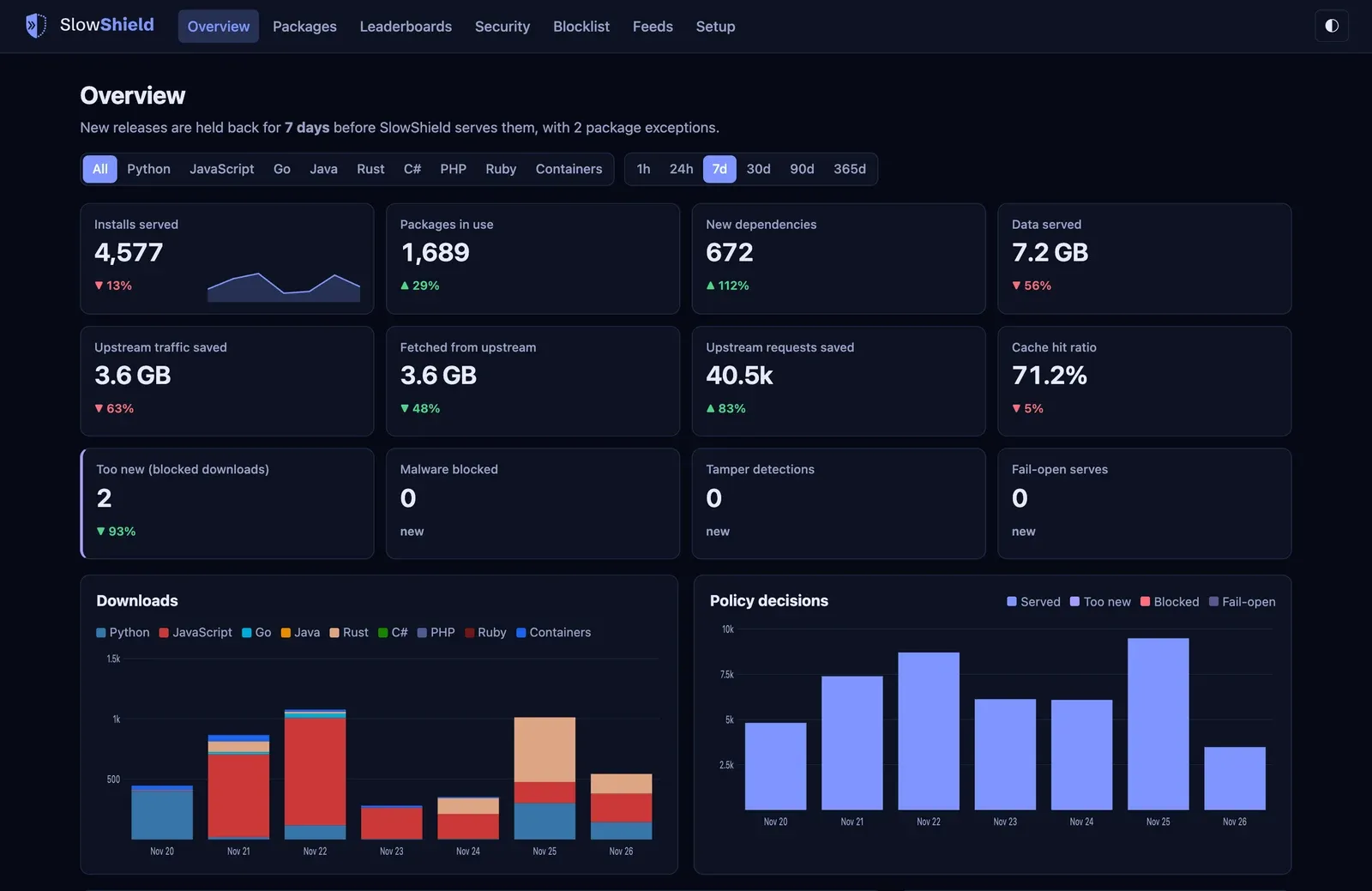
Last week it served 4,577 installs and refused 2 for being too new. Malware blocked: zero, which is the result I want. As a side effect all machines share one cache, and 71% of requests never left the house.
- Shell variables aren’t enough. Agents started by T3 Code don’t read the shell, so they went around the proxy. The registry now lives in each tool’s own config file.
- Agents need the exception path. A security fix for a package I already use gets through after one day. For anything newer, the agent asks me.
Next: part 4, where every machine shares one memory, and what that cost.
The prompt
Paste this into Claude Code or Codex:
Give my coding agents a quick way to see which of my machines is free.

First ask me which machines I have, what collects their metrics today (a
dashboard, Prometheus, Netdata, nothing), and which machines agents should
never use for work.

Build:
- one HTTP endpoint that returns a compact view per machine: up or down,
  cores, CPU now and over 5 minutes, free RAM and free disk, sorted with the
  best machine for new work first, as JSON and as a plain-text table
- a second endpoint that lists one machine's top processes by CPU and RAM
- a small `fleet` command that wraps both with curl, installed on every
  machine
- one line in my shared agent instructions: run `fleet` before placing new
  work, and prefer the top machine that suits the task

Rules:
- No MCP server and no SSH between machines. One read-only GET on my
  private network is enough.
- Keep the response small: no history, about 1 KB.
- Mark machines that are off, low on disk, or not meant for agent work.
- Then point every package manager on every machine at a proxy that holds
  new releases back for a few days, such as SlowShield. Set it in each
  tool's own config file, not in the shell, and tell agents how to ask for
  an exception.